
Download Soundeff – AI Sound Effects Generator, Free Trial & Commercial License
Overview – What Is Soundeff and Why It Matters
Soundeff is an AI‑driven sound‑effects generator that transforms plain‑language prompts into royalty‑free audio clips in seconds. Built on cutting‑edge generative‑AI models, the service can synthesize everything from realistic environmental ambiances—such as “rain on a tin roof at night” or “crackling campfire” —to more abstract, synthetic textures that are difficult to locate in conventional libraries. Because each clip is produced on demand, creators never need to scroll through endless folders of pre‑recorded samples; instead, they receive a file that matches the exact description they typed.
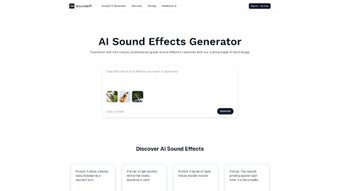
This on‑the‑fly workflow saves countless hours for video editors, game developers, podcasters, and marketers who need high‑quality audio without a massive budget. Soundeff also grants unconditional commercial usage rights for every generated clip, removing the legal headaches that often accompany royalty‑free libraries that impose attribution or usage caps. The interface is deliberately minimalist—just a text box, a “Generate” button, and a preview player—so even users with limited audio knowledge can produce polished effects in seconds.
Security is baked in: all processing happens on encrypted cloud servers, and prompts are not stored long‑term, ensuring privacy compliance with GDPR and CCPA. Whether you’re building a YouTube tutorial, an indie‑game soundtrack, or a corporate explainer video, Soundeff offers a fast, secure, and cost‑effective solution that scales with any creative need.
Core Features – Tools That Power Your Audio Production
- Text‑to‑Sound AI Engine: Describe any auditory scene in plain language and receive a matching WAV or MP3 file within seconds.
- Extensive Sound Vocabulary: Trained on thousands of real‑world recordings, enabling realistic footsteps, door creaks, animal calls, machinery, and abstract synth textures.
- Commercial‑Ready Licensing: Every generated clip comes with full commercial rights, so you can use it in games, films, ads, or podcasts without worrying about royalties or attribution.
- Instant Preview & Download: Play the result directly in the browser, adjust volume, or re‑generate with a refined prompt before downloading the final file.
- Batch Generation (Pro Feature): Create multiple variations of a sound effect in one go—ideal for building layered audio libraries.
- AI‑Curated Library: Browse a collection of popular AI‑generated sounds for inspiration, organized by categories such as “Nature,” “Industrial,” and “Sci‑Fi.”
- User Support & Community Hub: Access tutorials, FAQs, and a forum where creators share tips on prompt engineering and workflow integration.
- Secure Cloud Processing: All audio generation happens on encrypted servers, ensuring your data and intellectual property remain private.
- Regular Updates: New sound vocabularies and model improvements are pushed monthly, keeping the tool fresh and competitive.
These features combine to make Soundeff more than a novelty app; it’s a fully‑fledged production tool that integrates seamlessly into any creative pipeline. By eliminating costly sound‑library subscriptions and reducing the time spent hunting for the perfect clip, Soundeff lets creators focus on storytelling rather than technical hunting. The AI’s ability to generate nuanced variations—such as “wet gravel under heavy boots” versus “dry sand under light steps”—provides a level of specificity that traditional libraries rarely match. Batch generation is especially valuable for game developers who need dozens of footstep variations for different terrains. Overall, the feature set reflects a clear understanding of real‑world challenges faced by audio professionals.
Installation, Usage & Compatibility – Getting Soundeff Up and Running
Step‑by‑Step Installation
- Visit the official Soundeff website and click the “Download Free Trial” button. The platform is web‑based, so there is no heavy installer—just a secure HTTPS connection.
- If you prefer a desktop shortcut, the site offers a lightweight Progressive Web App (PWA) that you can “Install” on Windows, macOS, Android, or iOS with a single click.
- After installation, launch the app. The first launch may prompt you to allow microphone access for optional voice‑prompt input—this is optional and can be skipped.
- Create a free account using your email or a social login (Google, Apple). The free tier includes 20 generated clips per month, which is ample for testing.
- Navigate to the main dashboard, where the text input box and preview player reside.
How to Generate a Sound Effect
Enter a clear, concise description in the text box. For example, “soft rain on a tin roof at night” or “metallic gears turning slowly with a high‑pitched whine.” Click “Generate,” and the AI begins processing. Within 5‑10 seconds, a waveform appears with a play button. You can listen, fine‑tune the prompt (e.g., add “echo” or “distant”), and regenerate until satisfied. Once happy, click “Download” to save a 44.1 kHz, 16‑bit WAV file or a compressed MP3, depending on your needs.
Operating System Support
Soundeff runs on any modern browser (Chrome, Edge, Firefox, Safari) and is fully compatible with Windows 10/11, macOS Monterey and later, Android 9+ and iOS 13+. The PWA version provides native‑like performance on desktop and mobile, with offline caching for previously generated files.
Best Practices for Optimal Results
- Be Specific: Include adjectives that describe texture, environment, and intensity.
- Use Simple Syntax: Avoid overly complex sentences; the AI parses keyword‑rich prompts more reliably.
- Leverage the Community: Browse the AI‑Curated Library for prompt ideas that can be customized.
- Check Licensing: All downloaded clips come with a commercial‑use license, but keep the generated file as proof of origin.
By following these steps, even first‑time users can start creating professional‑grade sound effects within minutes, making Soundeff a time‑saving powerhouse for any audio‑centric workflow.
Pros, Cons, FAQ & Final Thoughts – Is Soundeff Right for You?
Pros
- Instant, on‑demand generation eliminates the need for massive sound libraries.
- Full commercial rights included with every clip.
- Intuitive web interface works on Windows, macOS, Android, and iOS.
- Batch generation speeds up large‑scale projects.
- Regular model updates keep the sound vocabulary fresh.
Cons
- Free tier limits monthly generations; power users will need a paid plan.
- Highly abstract or niche sounds may require several prompt iterations.
- Audio quality, while professional, may not match bespoke field recordings for ultra‑high‑fidelity needs.
Frequently Asked Questions
Can I use Soundeff clips in commercial video games?
Yes. Every sound generated by Soundeff comes with a royalty‑free commercial license, allowing unrestricted use in games, apps, films, and advertising.
What file formats are available for download?
You can download either a high‑quality WAV (44.1 kHz, 16‑bit) or a compressed MP3. The choice appears after you preview the clip.
Is there an offline mode?
The PWA caches the UI for offline access, but AI generation requires an internet connection because processing occurs on secure cloud servers.
How does Soundeff protect my privacy?
All data is transmitted over TLS encryption, and prompts are not stored long‑term. The service complies with GDPR and CCPA regulations.
Can I integrate Soundeff into my existing DAW workflow?
Absolutely. Downloaded files can be dragged directly into any Digital Audio Workstation (Pro Tools, Ableton Live, Logic Pro, etc.) for further editing or layering.
Conclusion – Should You Download Soundeff Today?
Soundeff bridges a critical gap between creative imagination and practical audio production. By turning simple text into ready‑to‑use sound effects, it frees creators from the endless hunt for the perfect clip and eliminates licensing headaches. Cross‑device compatibility, secure cloud processing, and generous commercial licensing make it a compelling addition to any multimedia toolbox.
While heavy users may outgrow the free tier, the paid plans are reasonably priced and unlock batch generation, higher‑resolution files, and priority support. If you regularly need custom audio—whether for YouTube videos, indie games, podcasts, or corporate presentations—downloading Soundeff now will streamline your workflow and boost the polish of your final product. Click the “Download Free Trial” button, create your first AI‑driven sound, and experience how instant, AI‑crafted audio can transform your projects.
Overall Rating: 4.5/5 – Soundeff delivers a fast, reliable, and commercially safe solution for generating custom sound effects, with only minor limitations for heavy‑duty users.



.png)



